

Correct Sitting Position: Types, Benefits & Proper Sitting Posture
Correct sitting posture means maintaining a comfortable and supported body position while sitting at a desk, driving, relaxing at home, or sitting on a bed. Poor sitting posture may contribute to neck or back discomfort, shoulder tension, stiffness, fatigue, and discomfort around the hips or tailbone, especially after sitting for long periods. Common causes include prolonged sitting, an improperly ajusted chair or car seat, poor lower-back support, an incorrectly positioned computer screen, unsupported feet, slouching, and staying in one position for too long.
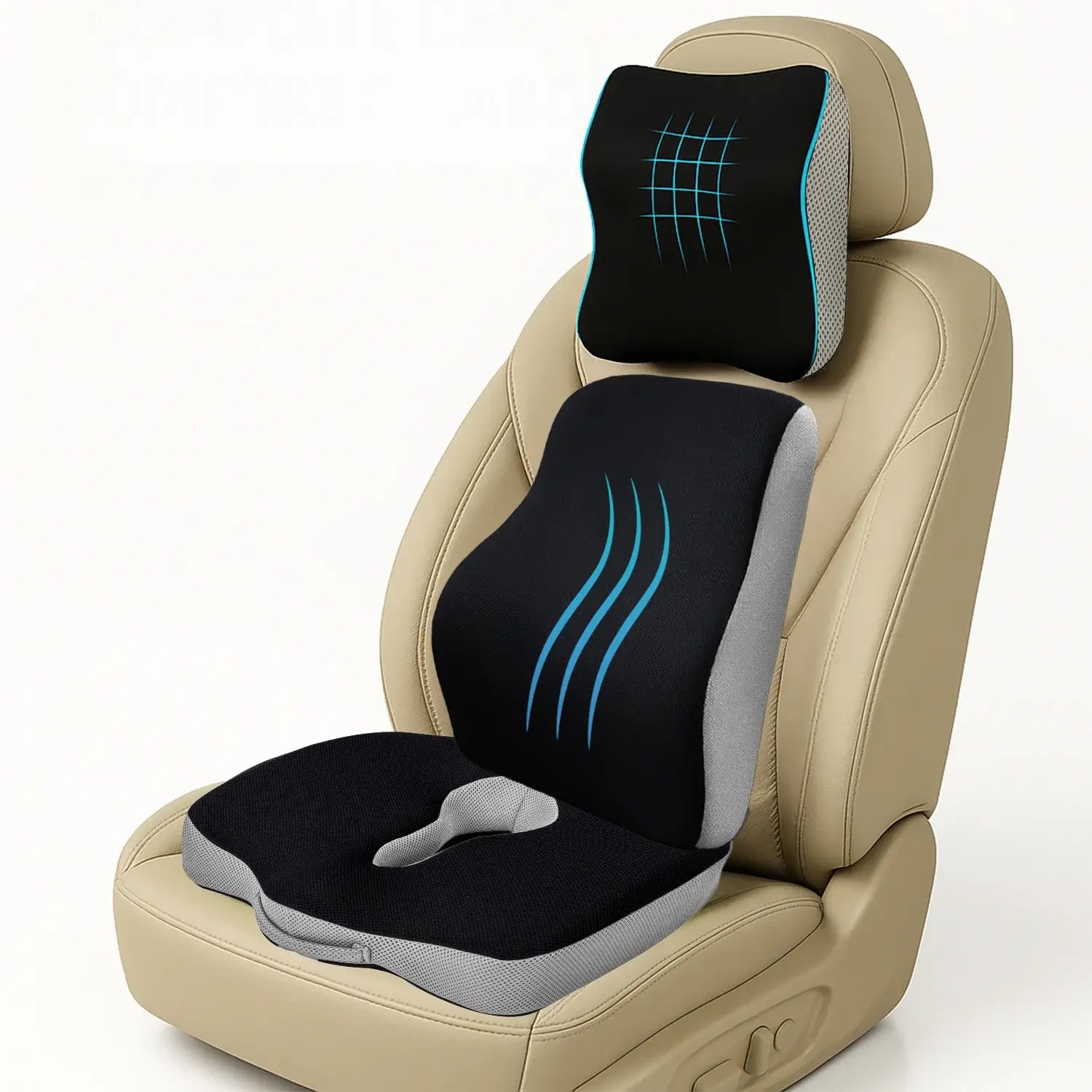
Improving your sitting setup can help promote better posture and comfort. This includes adjusting your chair, desk, monitor, and car seat, supporting your lower back, keeping your feet supported, changing positions regularly, and using suitable cushions such as a Lumbar Support Pillow, Wedge Pillow, Coccyx Pillow, or Donut Pillow when additional support or cushioning is needed.
In this blog, we explain the correct sitting position for office work, driving, sitting on a sofa or chair at home, and sitting on a bed with a Wedge Pillow, along with the benefits of good sitting posture, common mistakes, practical tips, and frequently asked questions.
Recommended Products




What Is the Correct Sitting Position?
Correct sitting position means sitting with your back supported, shoulders relaxed, feet supported, knees comfortably bent, and head and neck aligned with your body. Your screen and work equipment should also be positioned so you don't need to lean, twist, or bend your neck for long periods.
Good sitting posture can help by:
- Reducing unnecessary strain on the back, neck, and shoulders
- Supporting the natural alignment of the spine
- Reducing stress on muscles, joints, and ligaments
- Maintaining better balance and stability while sitting
- Reducing the risk of discomfort caused by prolonged or awkward sitting positions
- Making long periods of sitting more comfortably
Good posture does not mean staying completely still or sitting rigidly. Changing positions regularly and taking movement breaks are also important for comfortable sitting.
Office Sitting Position: Correct Sitting Posture at a Desk

Sitting at a desk for several hours can gradually lead to slouching, rounded shoulders, or leaning your head toward the screen. While these positions may feel comfortable for a short time, staying in them for long periods can place unnecessary stress on your neck, shoulders, and back. A proper office sitting position starts with adjusting your chair, desk, monitor, keyboard, and mouse so they support a comfortable and balanced posture.
1. Adjust Your Chair Height
Start by adjusting your chair so that both feet can rest comfortably on the floor. Your knees should remain comfortably bent, with your thighs supported by the seat. If you need to raise your chair to match the height of your desk and your feet no longer reach the floor, use a stable footrest for additional support. Your chair should also allow you to sit close enough to the desk without leaning or reaching forward.
2. Support Your Lower Back
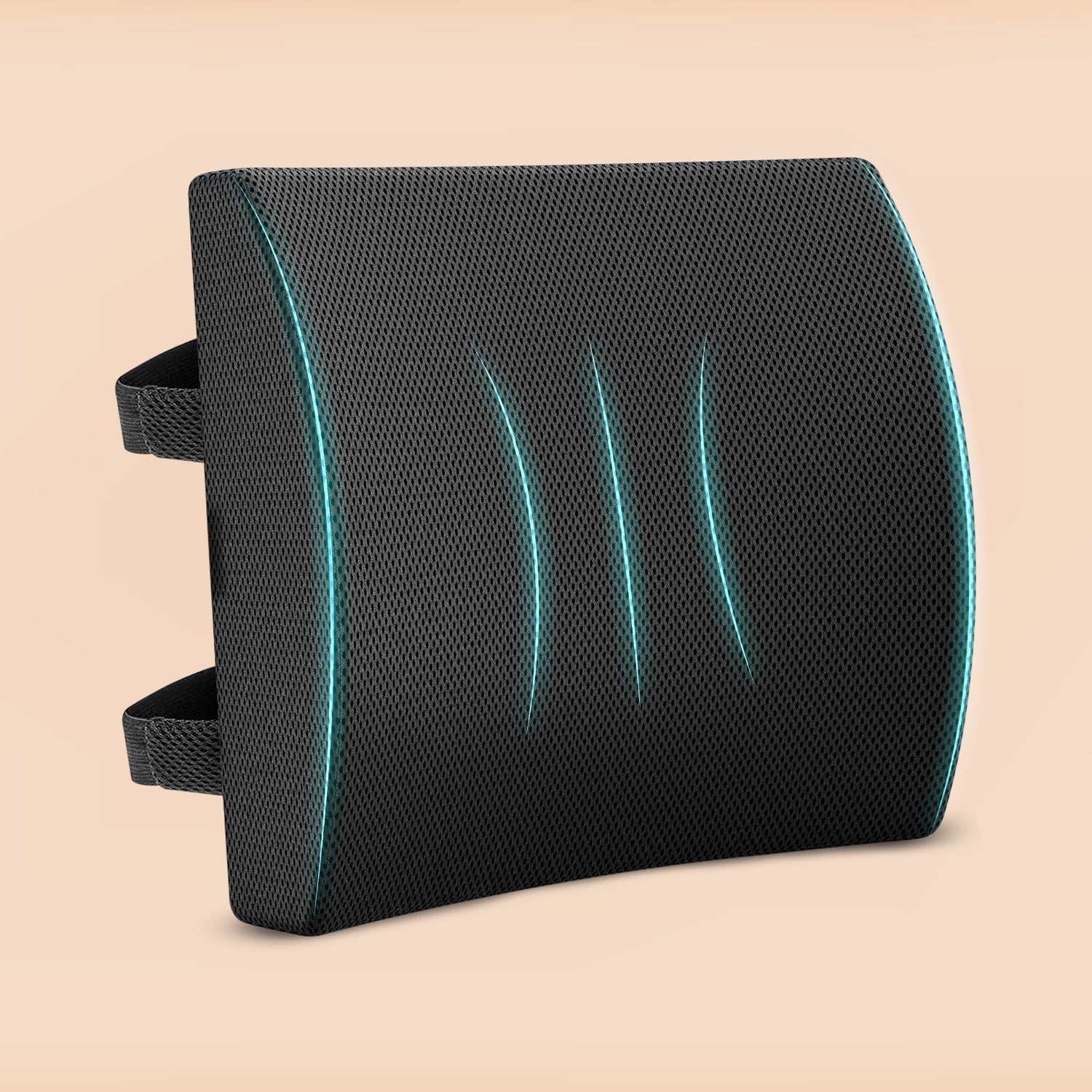
Your lower back should remain supported by the chair's backrest. Avoid sitting on the edge of the chair for long periods, as this can leave your lower back without adequate support. If your chair does not provide enough support, a Lumbar Support Pillow can add cushioning around the lower back and make it easier to maintain a comfortable sitting position. The aim is to support your natural posture rather than force your back into a rigid position.
3. Keep Your Shoulders Relaxed
Keep your shoulders relaxed while typing, using a mouse, or working at your desk. Avoid raising your shoulders toward your ears or rounding them forward. Keep your upper arms close to your body and your elbows comfortably bent. Supporting your forearms when appropriate can also help maintain a more relaxed position.
4. Position Your Monitor Correctly
Place your monitor directly in front of you so you do not have to repeatedly turn your head to one side. The top of the screen should generally be at or slightly below eye level, with the monitor positioned at a comfortable viewing distance. This setup can help reduce the tendency to lean forward, bend your neck, or tilt your head to see the screen.
5. Keep Your Keyboard and Mouse Within Easy Reach
Position your keyboard and mouse close enough that you can use them without stretching your arms or leaning forward. Keep your wrists relatively straight while typing and avoid raising your shoulders when using the keyboard or mouse. Your arms should remain relaxed and your elbows comfortably bent.
6. Keep Both Feet Supported
Whenever possible, keep both feet flat on the floor while working. If your feet cannot reach the floor because of your chair height, use a stable footrest. Occasionally crossing your legs is not necessarily a problem, but avoid staying in the same crossed-leg position for extended periods. Changing your position regularly can help you stay more comfortable throughout the workday.
Types of Sitting Position

People often adopt a sitting position without realizing it, especially when they are focused on work, driving, watching television, or using their phone. The sitting posture can also vary depending on the type of seat being used, such as an office chair, ergonomic chair, armchair, stool, sofa, beanbag, or car seat.
Common sitting postures include:
- Upright sitting: Sitting with the back relatively straight, with or without lower-back support.
- Leg-crossed sitting: Sitting with one knee crossed over the other or with the ankles crossed.
- Hunched sitting: Leaning forward with the upper back and shoulders rounded.
- Slumped sitting: Sliding down in the seat with the back rounded and the head pushed forward.
- Reclined sitting: Leaning backward against the backrest for support.
- Cross-legged sitting: Sitting with both legs crossed, often on the floor or a bed.
- Side-leaning sitting: Shifting the body weight toward one side instead of keeping the body centered.
- Edge sitting: Sitting toward the front edge of the seat with limited back support.
- Kneeling position: Sitting with the knees bent underneath or in front of the body.
Not all of these positions are necessarily harmful when used briefly. However, staying in an awkward or unsupported position for long periods can lead to discomfort. A better approach is to use a comfortable, supported posture and change positions regularly throughout the day.
Car Driving Sitting Position: How to Sit Correctly While Driving

Driving requires a properly adjusted sitting position because your body needs to remain supported while your hands operate the steering wheel and your feet control the pedals. An incorrectly positioned driver's seat can make you lean forward, stretch toward the steering wheel, or keep your legs in an uncomfortable position. Before starting your journey, take a moment to adjust the seat, backrest, headrest, steering wheel, and leg position.
1. Adjust the Seat Distance
Move the driver's seat so you can comfortably reach the pedals without stretching your legs. Your knees should remain slightly bent when operating the pedals, allowing you to move your feet easily between them. Avoid positioning the seat too far back, which can force you to straighten your legs, or too close to the steering wheel, which can restrict your movement.
2. Keep Your Back Against the Seat
Keep your back supported by the seatback instead of leaning forward while driving. Adjust the backrest so your torso feels comfortably supported and you can reach the steering wheel without stretching. If the seat does not provide enough lower-back support, a Lumbar Support Pillow can add cushioning and support to the natural curve of your lower back. It should provide support without pushing your body too far forward.
3. Adjust the Headrest
Adjust the head restraint so it is positioned appropriately behind your head, with the top of the restraint roughly level with the top of your head where possible. Avoid driving with your head consistently pushed forward or tilted to one side. A properly positioned headrest should complement the seat's support and allow you to maintain a comfortable head position.
4. Position Your Legs Comfortably
Keep your legs relaxed with your knees slightly bent. Your feet should be able to move between the pedals without excessive reaching or stretching. Avoid tucking one leg underneath your body or keeping your legs in an awkward position while driving.
5. Position the Steering Wheel
Adjust the steering wheel so you can reach it comfortably without leaning or stretching your arms forward. Your shoulders should remain relaxed while holding the wheel. If you need to move your upper body away from the seatback to reach the steering wheel, readjust both the seat and steering wheel before driving.
6. Use Lumbar Support When Needed
Long drives can become uncomfortable when the lower back does not receive adequate support. A Lumbar Support Pillow can provide additional cushioning and support around the lower back when the driver's seat lacks sufficient support. However, a cushion should complement proper seat adjustment rather than compensate for a poorly positioned driver's seat.
Home Sitting Position on a Sofa and Chair

At home, it is common to spend long periods relaxing on a sofa or sitting on a chair. However, soft cushions, deep seats, or inadequate back support can make it easier to slouch or sit in an awkward position. Choosing a supported sitting position and changing your posture regularly can help improve comfort.
How to Sit Properly on a Sofa
A sofa should support your back without forcing you to lean forward or slide down into the seat. Keep these tips in mind:
- Sit far enough back so your back is supported by the backrest.
- Keep your lower back comfortably supported.
- Avoid sliding your hips forward while leaning your upper body backward.
- Keep your feet in a comfortable and supported position.
- Avoid staying in the same sitting position for several hours.
- Change your sitting position regularly and take movement breaks.
- Place a cushion behind your lower back if the sofa is deep and encourages slouching.
- Use a Lumbar Support Pillow if your sofa does not provide enough lower-back support.
How to Sit Properly on a Chair at Home

Whether you are using a dining chair, study chair, or another upright chair, proper positioning can help you sit more comfortably:
- Sit with your hips positioned toward the back of the seat.
- Keep your back supported by the chair's backrest.
- Keep both feet flat on the floor or comfortably supported.
- Keep your shoulders relaxed and avoid rounding them forward.
- Keep your head and neck comfortably aligned with your body.
- Avoid leaning toward one side for long periods.
- Avoid sitting on the edge of the chair without adequate back support.
- If a firm chair creates pressure around the tailbone, use a Coccyx Pillow for additional cushioning and sitting comfort.
Sitting Position on Bed with a Wedge Pillow

A bed provides a soft and comfortable surface, but it does not offer the structured support of an office chair. When sitting on a bed to read, watch TV, use a laptop, or relax, your back and legs may need additional support. A Wedge Pillow can help create a more elevated and supported sitting position while reducing the tendency to slump.
How to Sit on a Bed with a Wedge Pillow
Follow these simple tips to create a more comfortable and supported sitting position:
1. Place the Wedge Pillow Behind Your Back
- Position the wider side of the Wedge Pillow against the headboard or another stable surface.
- Sit with your back resting comfortably against the pillow.
- Use the Wedge Pillow to support your back and maintain a comfortable, supported sitting position rather than sitting unsupported on the mattress.
- Make sure the pillow provides support across your back rather than only at one point.
2. Keep Your Back Supported
- Avoid sitting upright without back support for long periods on a soft mattress.
- Use the wedge to maintain a comfortable, slightly reclined position.
- Keep your shoulders relaxed and avoid rounding your upper back.
- If using a phone or laptop, avoid leaning forward for extended periods.
3. Support Your Legs
- Keep your legs relaxed and comfortably positioned.
- You can extend your legs in front of you or keep your knees slightly bent.
- Avoid twisting or holding your legs in an awkward position for long periods.
- If you need additional cushioning, place a regular pillow under your knees or lower legs.
4. Keep Your Screen at a Comfortable Height
- Avoid keeping your laptop or tablet too low on your lap for extended periods.
- Raise the device, when possible, to reduce excessive neck bending.
- Position the screen at a comfortable height that allows you to keep your head and neck more naturally aligned.
5. Avoid Sliding Down the Bed
- Check your sitting position regularly, especially when relaxing for a long time.
- Avoid allowing your hips to slide forward while your upper back rounds.
- If you notice yourself slouching or sliding downward, readjust the Wedge Pillow and reposition your legs and back.
- Take regular breaks to change your position or move around.
Benefits of Correct Sitting Posture
- Better Alignment: Keeps your head, neck, shoulders, back, hips, and legs in a comfortable position.
- Less Strain: Reduces unnecessary bending, twisting, reaching, and leaning while sitting.
- Lower-Back Support: A supportive chair or Lumbar Support Pillow can provide better support for the lower back.
- More Comfort: Proper cushioning can make prolonged sitting more comfortable.
- Better Work Setup: Correct positioning of the monitor, keyboard, mouse, chair, and feet supports a comfortable working posture.
- Less Muscle Effort: A supported sitting position may reduce the effort needed to maintain an awkward posture.
- Easier Movement: A balanced sitting position makes it easier to change positions and move comfortably throughout the day.
Common Sitting Posture Mistakes to Avoid
Even with a comfortable chair or cushion, certain everyday habits can affect your sitting posture.
Avoid these common mistakes:
- Slouching: Sliding forward and rounding your shoulders can leave your lower back unsupported. Better approach: Sit back in the chair and use the backrest for support.
- Sitting Too Far from the Desk: Reaching for the keyboard or mouse can cause you to lean forward. Better approach: Move your chair closer so frequently used items are within easy reach.
- Looking Down at a Laptop: A low laptop screen can make you bend your neck forward. Better approach: Raise the screen and use a separate keyboard and mouse when possible.
- Letting Your Feet Hang: Unsupported feet can affect your overall sitting position. Better approach: Adjust your chair height or use a stable footrest.
- Sitting on the Edge of the Chair: Sitting too far forward reduces back support. Better approach: Position your hips toward the back of the seat and use the backrest.
- Crossing Your Legs for Long Periods: Staying in the same crossed-leg position for too long may cause discomfort. Better approach: Change positions regularly and keep both feet supported when working.
- Staying in One Position Too Long: Even a good sitting posture can become uncomfortable when maintained for hours. Better approach: Stand up, walk around, stretch, or change your sitting position regularly.
Some Tips for Maintaining Better Sitting Posture
Good sitting posture becomes easier when your chair, desk, and seating setup are adjusted to support your body.
Keep these simple tips in mind:
- Adjust Your Setup: Do not force your body into an uncomfortable position. If you have to bend your neck, reach for your keyboard, or raise your shoulders while working, adjust your workstation.
- Use Support Where Needed: A Lumbar Support Pillow can provide additional lower-back support, while a Coccyx Pillow or Donut Pillow can add cushioning when prolonged sitting causes discomfort around the sitting area. For sitting on a bed, a Wedge Pillow can provide additional back support.
- Change Positions Regularly: You do not need to maintain one "perfect" posture all day. Change your position, stand during calls, walk between tasks, or take short movement breaks.
- Keep Essentials Within Reach: Place your keyboard, mouse, phone, and other frequently used items close enough to avoid unnecessary reaching, twisting, or leaning.
- Listen to Your Body: If a sitting position repeatedly causes discomfort, numbness, tingling, or pain, adjust your seating setup instead of ignoring the symptoms. Persistent or severe symptoms should be discussed with a qualified healthcare professional.
Conclusion
Correct sitting posture is not about sitting in one rigid position all day. It is about keeping your body comfortably supported, maintaining a natural alignment, and changing positions regularly. Whether you are working at a desk, driving, relaxing on a sofa, or sitting on your bed, small adjustments to your seating setup can make every day sitting more comfortably.
The right support can make a difference to your sitting experience. From a Lumbar Support Pillow for lower-back support to a Coccyx Pillow or Donut Pillow for added cushioning, and a Wedge Pillow for supported bed sitting, choose what suits your seating needs and comfort.
Make every sitting moment more comfortable with Sleepsia. Explore our range of supportive cushions and pillows and find the right comfort for your everyday sitting needs.
FAQs
Q1: What is the correct sitting position for long hours?Ans: Sit with your back supported, shoulders relaxed, feet supported, and knees comfortably bent. Keep your head and neck aligned and change your position regularly.
Q2: How should I sit correctly at a desk?Ans: Keep your lower back supported, feet flat on the floor or a footrest, and monitor at a comfortable height. Keep your keyboard and mouse within easy reach to avoid leaning forward.
Q3: What is the best sitting position while driving?Ans: Adjust the seat so your knees remain slightly bent and your feet can comfortably reach the pedals. Keep your back against the seat, adjust the headrest, and position the steering wheel so you do not need to lean forward.
Q4: Can a Lumbar Support Pillow improve sitting comfort?Ans: A Lumbar Support Pillow can provide additional lower-back support when a chair or car seat does not provide enough cushioning. It should complement proper seat adjustment rather than replace it.
Q5: How should I sit on a bed with a Wedge Pillow?Ans: Place the Wedge Pillow behind your back to create a supported, slightly reclined position. Keep your legs comfortable and avoid bending your neck forward when using a phone or laptop.
Q6: Can I use a Coccyx Pillow or Donut Pillow on a bed?Ans: Yes, both can be used while sitting upright on a bed for activities such as reading or working. These cushions are designed primarily for sitting rather than sleeping, so follow the product instructions for appropriate use.
Q7: How can I avoid poor sitting posture?Ans: Avoid slouching, sitting on the edge of the seat, leaning to one side, looking down at a laptop, or staying in one position for too long. Adjust your seating setup and take regular movement breaks.
Benefits of Virabhadrasana (Warrior Pose) & How to Practice
Benefits of Prasarita Padahastasana (Wide-Leg Forward Bend) & How to Practice
Recent Posts

Benefits of Marjariasana (Cat Stretch Pose) & How to Practice

How to Choose the Right Double Bedsheet Size for Your Mattress

Why Does a Cotton Bedsheet Feel Better in Summer? Benefits of Breathable Fabric

Helping Kids Sleep Through the Night: A Parent's Guide

Sleep Solutions for Seniors: Managing Arthritis & Joint Pain at Night

Best Sleep Setup for Pregnant Women in Each Trimester

Benefits of Padmasana (Lotus Pose) & How to Practice It

